
Morfiade — Google Chrome profile manager
Ten accounts in one Chrome — and not a single re-login
Two Steam accounts, three Gmail inboxes, four Twitter logins open side by side like ordinary windows, each one remembering its own sign-in. You switch with a click, not a logout. Profiles are created by the hundred, each with its own proxy.
· 7 days, 100 profiles, no card needed.
Where this came from
There used to be a browser extension called SessionBox: it let you keep several sessions of the same site open in one Chrome. Chrome closed off that capability, the extension stopped working — and the underlying need stayed, for anyone with more than one account anywhere.
Morfiade started as a SessionBox replacement built for personal use. Then came proxies, then bulk profile creation, then a consistent fingerprint — and the extension grew into a program. But the original idea did not change: less routine, not more settings. And it still runs on your own machine, not someone else's cloud — because that is exactly what made SessionBox convenient in the first place.
If you landed here searching for the name and want the short answer — what Morfiade is, in plain words.
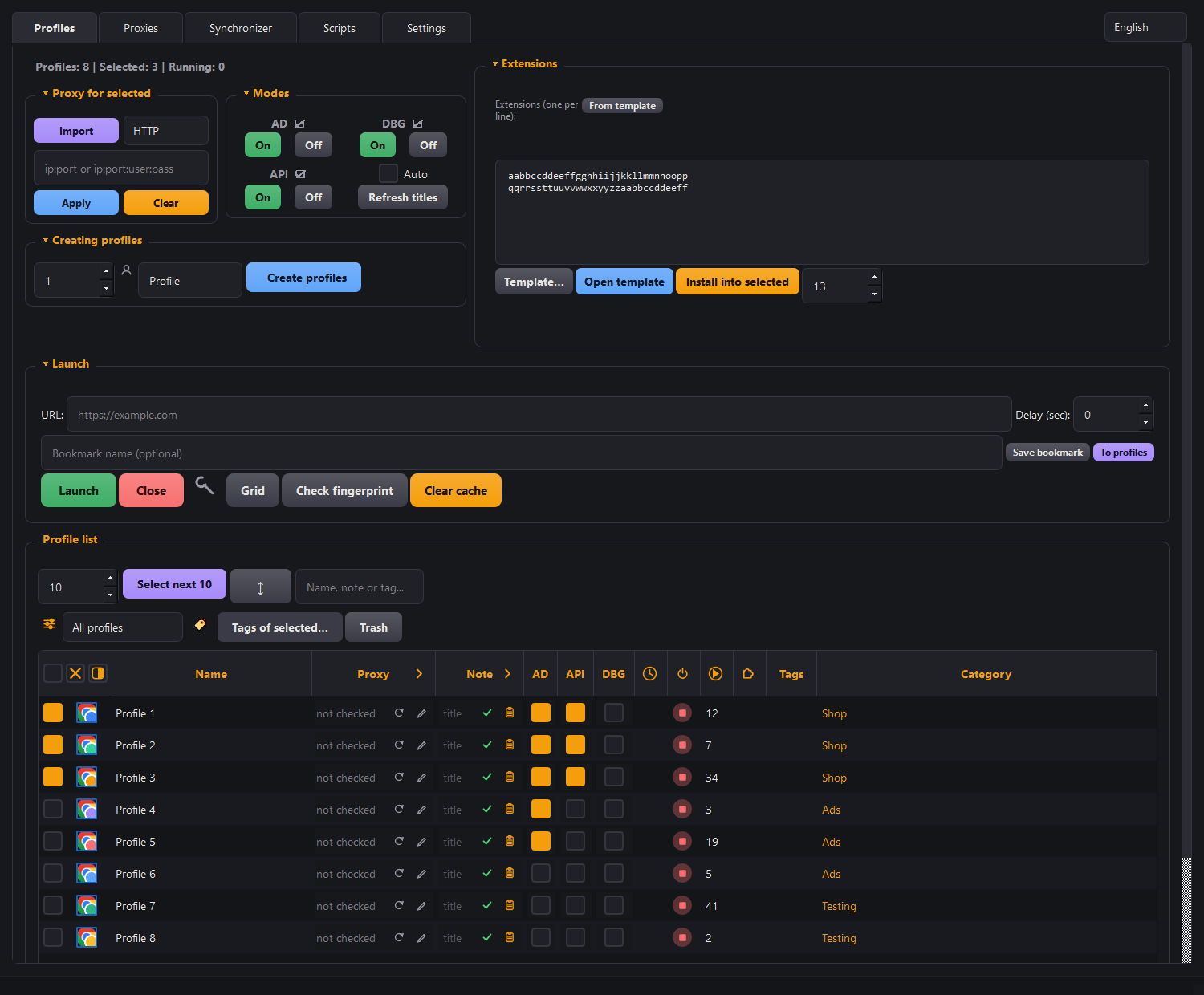
The simplest way to think of a profile is as a permanent sandbox. A private window gives you a clean slate, but only one, and only until you close it: the sign-in is not saved, and to the site you are still the same person — incognito hides your traces from your own computer, not from the site. A profile gives you that same clean-slate feeling, except you can have a hundred sandboxes, each one remembering its own sign-in, each with its own proxy.
What stops hurting
No need to log out to log in
A second account on the same site opens next to the first one, not instead of it. Each profile remembers its own sign-in and its own passwords — stored in that profile, not in one shared pile.
Accounts do not overlap
A separate profile means separate storage for cookies, passwords and extensions. No site sees traces of the neighbouring account in this window.
No need to remember which is which
The profile name is visible in the window itself: a coloured frame and a badge on the page. Plus categories, search and human sorting — pir2 before pir10, not after.
How it works
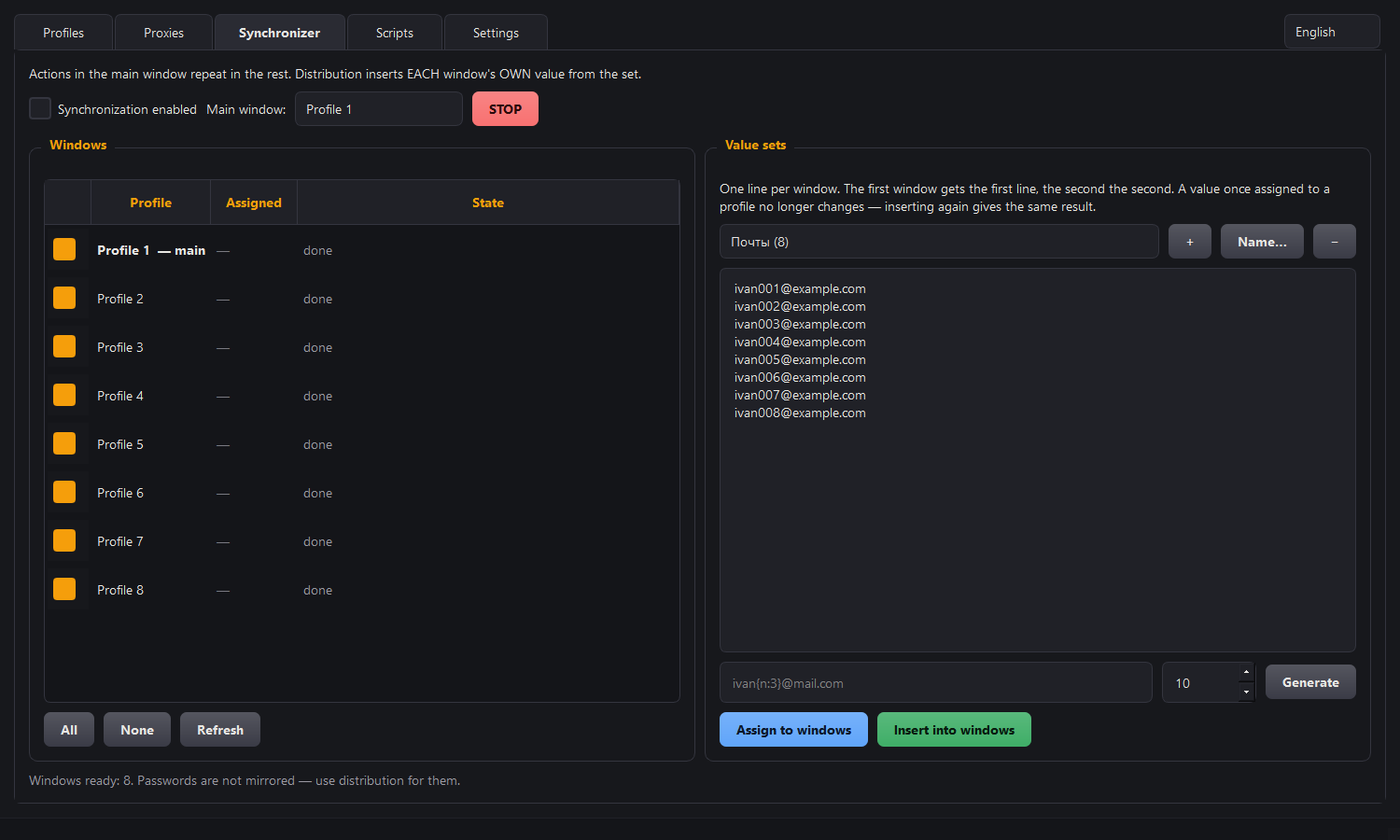
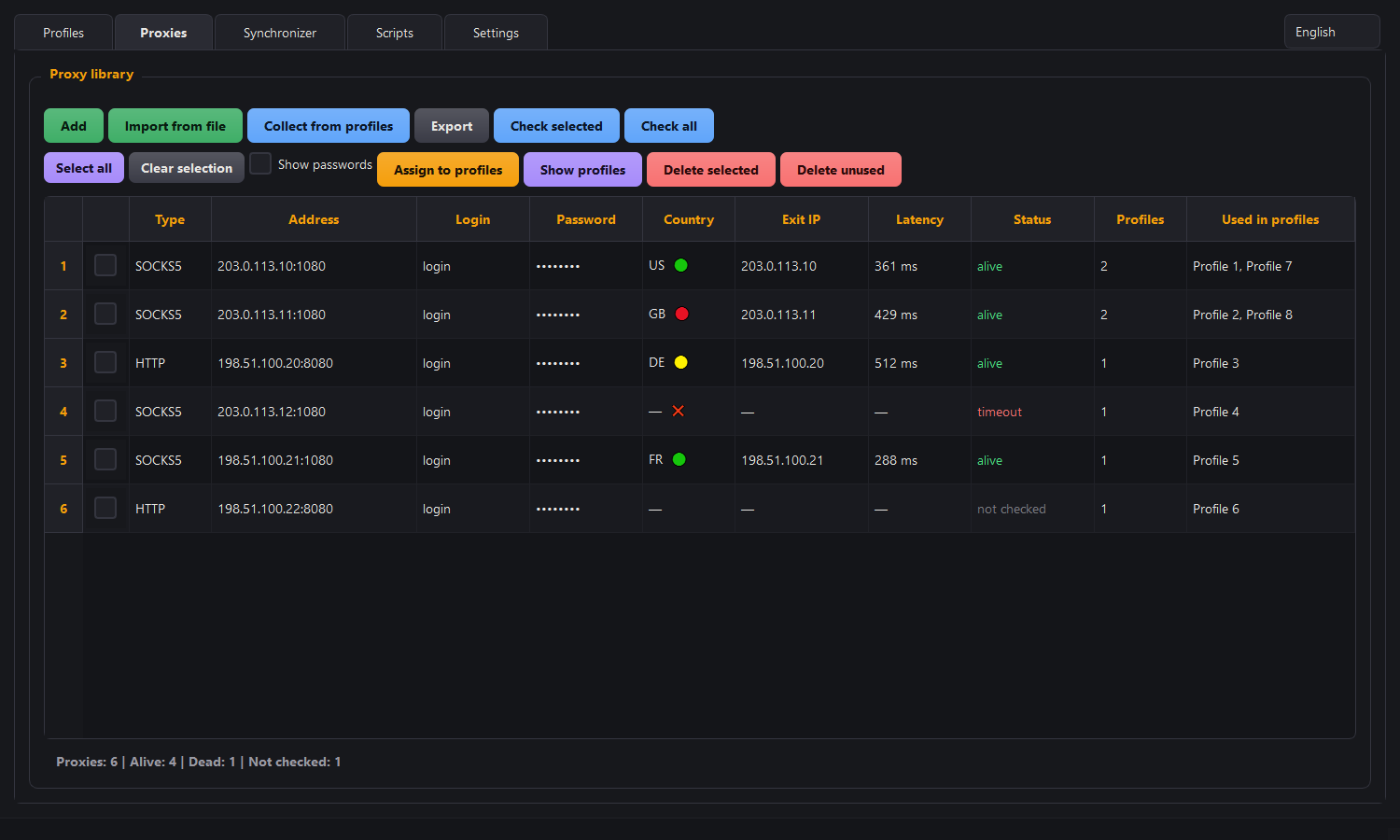
Screenshots of the real program window, with made-up profiles and addresses.
One action, in every window at once
The synchroniser repeats what you do in the leading window in all the others. And the handout puts its own value from your list into each window — an email, a login, a number.
- the value is pinned to the profile, not to a place in the queue: repeating the handout gives the same profile the same line
- you see in advance who gets what — the "Will get" column
- the action is addressed to a field or a button, not to a screen point: window sizes and full screen break nothing
- text is set on the field directly, so any language works, not just English
- if the windows drift apart, it stops by itself and says why
- passwords are not mirrored, and each profile joins in separately
Every profile has its own proxy
Not one address for the whole program, but one per window. A separate tab keeps the library of addresses and shows which profile uses which.
- HTTP, SOCKS4, SOCKS5 — with a login and password
- Chrome shows no authentication dialogs: the program raises a local forwarder
- connectivity, external address, country and latency are checked before launch
- import as a list, pasted from the clipboard
Your own scripts and a local API
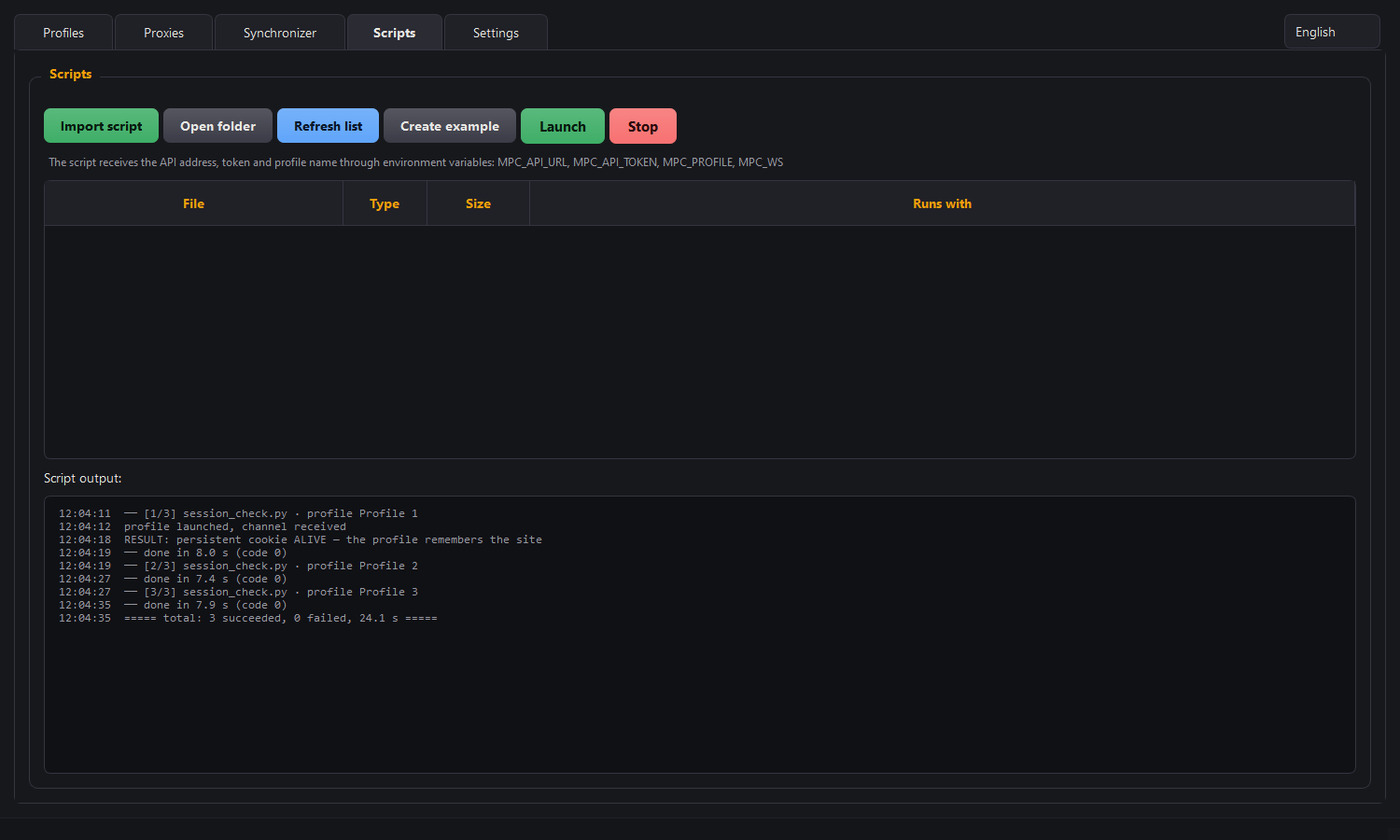
The "Scripts" tab runs your code straight from the program and shows the output in the window. A run can be interrupted at any moment.
.py,.js,.mjs,.ts,.ps1,.bat,.cmd- the API address and token arrive in environment variables
- when a profile starts, the API hands over its debugging channel — from there Playwright or Puppeteer drive the browser themselves
- an AI agent connects to that same API: it does the work itself, and afterwards you save what it did as a script
- the API listens on
127.0.0.1only and requires a token
Order when there are a hundred profiles
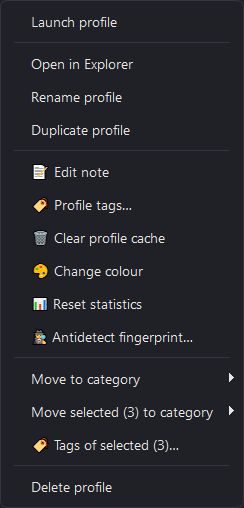
Right-click a row and everything you need to do with that profile is at hand. Getting the window wrong with a dozen accounts open costs more than it seems.
- categories, notes and a colour mark
- duplicating a profile and clearing its cache
- the anti-detect fingerprint in its own window, with a summary and warnings
- human sorting:
pir2beforepir10
What else it does
Everything listed works in version 3.46 — this is not a list of plans.
Bulk creation
Hundreds of profiles in one go, from a prefix with a number. A category with the same name appears by itself.
Launching several at a time
Profiles open as a batch and the windows are laid out on a grid. The interface does not freeze while it happens.
Extensions in batches
An extension store inside the program: install what you need into a dozen selected profiles at once.
A consistent fingerprint
Time zone, language, Client Hints and canvas noise are derived from the proxy's country, not picked at random. How exactly.
Moving and backups
Export profiles together with their cookies and import them on another computer — the sessions stay alive.
Cookies from elsewhere fit
Import understands JSON from other profile managers and a plain cookies.txt — you do not have to move in from scratch.
Tags and notes
As many tags on a profile as you need, unlike a category: "warming up", "US", "for sale" all at once. A note is visible and edited right in the table.
Trash
A deleted profile does not vanish, it waits in the trash — with its cookies, proxy and tags. Nothing is cleaned on a schedule: only you do that.
Connecting an AI assistant
The program can act as an MCP server: you can give the assistant work in plain words. The agent sees only the profiles you allowed, and deletes strictly into the trash. More.
Your data stays with you
Morfiade is an ordinary Windows program, not a cloud dashboard. Profiles, cookies and passwords live on your disk. We cannot read them: we have neither your disk nor the key to it.
The other side of that, which we say honestly: there is no syncing between computers "by itself". Moving is done by export and import.
And the browser is yours too
The program launches the real Google Chrome already installed on the computer, not its own Chromium build. Which means the browser version is always current and the fingerprint is genuine.
Common questions
Will this save an account from a ban?
No, and nothing will. Profiles are isolated so that accounts are not linked to each other; that does not cancel a platform's rules.
Are proxies included in the price?
No, you buy proxies separately and from whoever you like. What kinds there are and where not to economise — in the write-up.
If I stop paying, do I lose my profiles?
No. They are your files on your disk, and backup and export work with a closed licence too.
Is there a version for Mac or Linux?
No, Windows 10 and 11 only. And the program does not disguise itself "as a MacBook": the mismatch shows up more than the truth does.
Can I pull my profiles from my regular Chrome?
Yes: bookmarks, history, settings and extensions move into the manager with one button. But Chrome won't hand over website sessions or passwords — since version 127 it encrypts them so they can't be read outside its own folder. Why, and what to do about it.
Are Firefox or Edge supported?
No. Morfiade works only with Google Chrome — the one already installed on your computer. We have no browser build of our own.
Try it on your own accounts
7 days, 100 profiles, no card.
Point your phone at it and it opens .
It hands you a key and the installer. If Telegram is already on this computer — open it straight in the Telegram app.